
My Second Brain Runs on Markdown and AI Agents. Every Meeting Lands in It Automatically

Most of my working day is meetings. Customer calls, team syncs, hiring, planning. For a long time my second brain knew everything about my work except the one thing that mattered most: what was actually said and agreed in those meetings.
That changed when I stopped treating meeting notes as something I write and started treating them as data that flows into my second brain on its own. Today every meeting I record lands in my vault a few minutes after it ends, and the AI agents I work with every day read it like everything else.
This post is how that setup works, what I ask it, and how to build your own in an afternoon.
The screenshots below come from a demo vault filled with sample meetings, not my own. The setup is the same one I use every day.
The gap in most second brains
A second brain is only as good as what goes into it. Articles, ideas and project notes are easy to capture. Meetings are not:
- Notes taken by hand are partial. You can't listen, think and type at the same time, so the notes miss the number someone agreed to or the date someone promised.
- Recordings sit in another app. Even when a meeting is recorded, the summary lives in a tool your notes, your search and your AI agents never see.
- Decisions get lost. Six weeks later nobody remembers why the price was $54,000 and not $60,000, or who owned the security follow-up.
I wanted every meeting in the same place as the rest of my thinking, in a format any tool can read, without copying anything by hand.
My setup in one picture
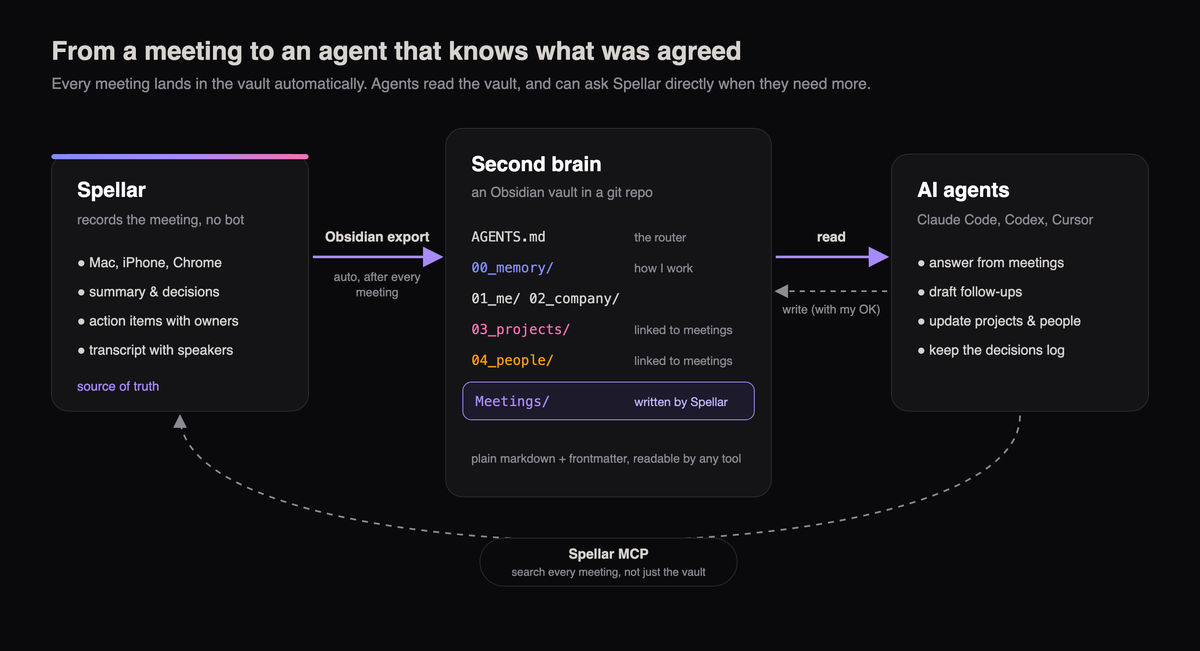
Three parts, each doing one job:
- Spellar records the meeting on my Mac, iPhone or in Chrome, with no bot in the call, and writes the summary, decisions, action items with owners and the transcript.
- The Obsidian export writes that meeting into my vault, automatically, after every meeting.
- AI agents read the vault. Claude Code, Codex, Cursor: whichever I'm using that day. They answer questions, draft follow-ups and keep my project and people notes current.
The vault: one folder, numbered, with a router
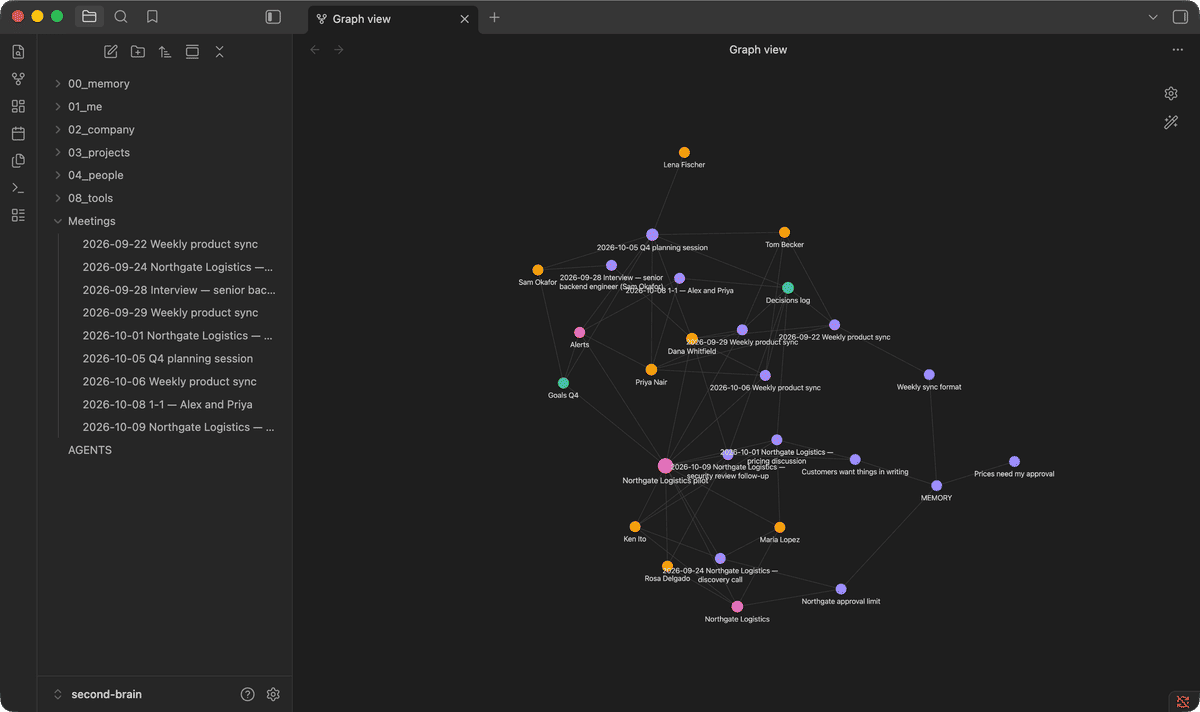
My second brain is a plain folder of markdown files. It is an Obsidian vault, so I can browse it, link notes and see the graph. It is also a git repository, so every change has a history and every change an agent makes is something I can review before it lands.
The folders are numbered so a listing always reads in the same order:
00_memory/how I work: one short note per fact, with the reason behind it01_me/goals and weekly reviews02_company/strategy and the decisions log03_projects/one note per project, linked to its meetings and people04_people/one note per person I work withMeetings/written by Spellar, one note per meeting
At the root sits one file that matters more than any other: AGENTS.md. It is the router. Every agent reads it first, and it says what lives where, what an agent may change, and what is off-limits. Instead of a giant prompt I paste into every chat, the instructions live in the vault, next to the knowledge they describe.
The 00_memory/ folder is how the brain learns. When I correct an agent ("never send a price to a customer without my OK"), that rule becomes a one-line note with the reason behind it. An index of those notes is loaded at the start of every session, so the next agent already knows.
How meetings get in
This is the part that used to be manual and now isn't. In the Spellar Mac app:
- Open Settings → Connectors → Obsidian and choose your vault folder.
- Turn on auto-export.
- Record your meetings as usual.
When a meeting's notes are ready, Spellar writes it to a Meetings/ folder in your vault as YYYY-MM-DD Title.md. You can also export a single meeting from its Export menu. Obsidian export is part of Spellar Pro.
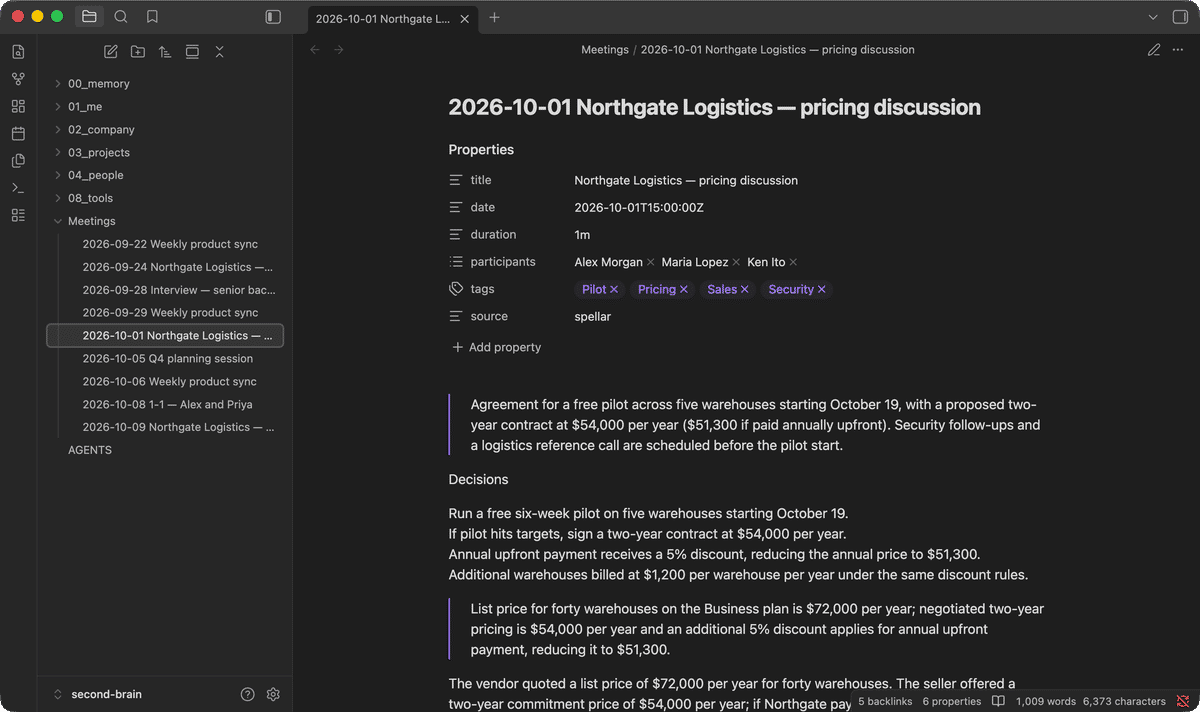
Each note is plain markdown that any tool can read:
- Properties: title, date, duration, participants and tags, so you can filter and query meetings like any other note.
- Summary and decisions, the same ones you see in Spellar.
- Key topics as
[[wikilinks]], so meetings connect to each other in Obsidian. - Action items with their owners and context.
- The full transcript, with speaker names and timestamps.
- A link back to the meeting in Spellar.
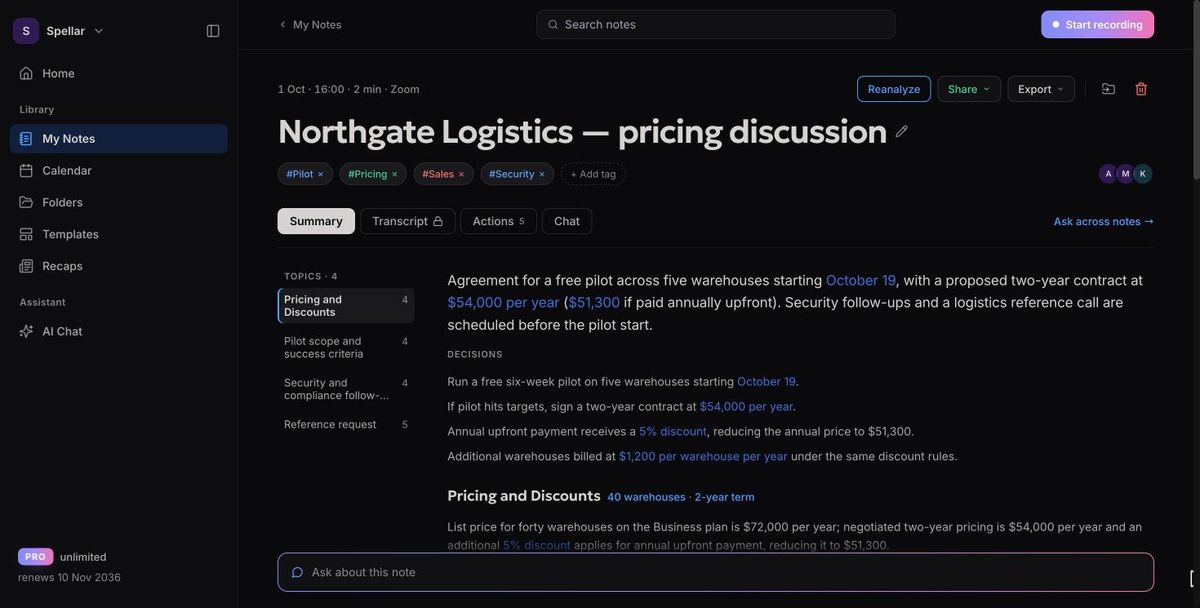
Spellar stays the source of truth. If I want to replay a moment, ask a follow-up or share the notes, I open the meeting there.
From meeting notes to a brain
A folder of meetings is useful. A folder of meetings that keeps the rest of the brain up to date is a different thing.
After a day of calls I ask an agent to read the new meetings and update the projects and people they touch. It adds the meeting to the project's timeline, moves open items, and adds a line to the decisions log with a link to the meeting it came from. I review the change and merge it.
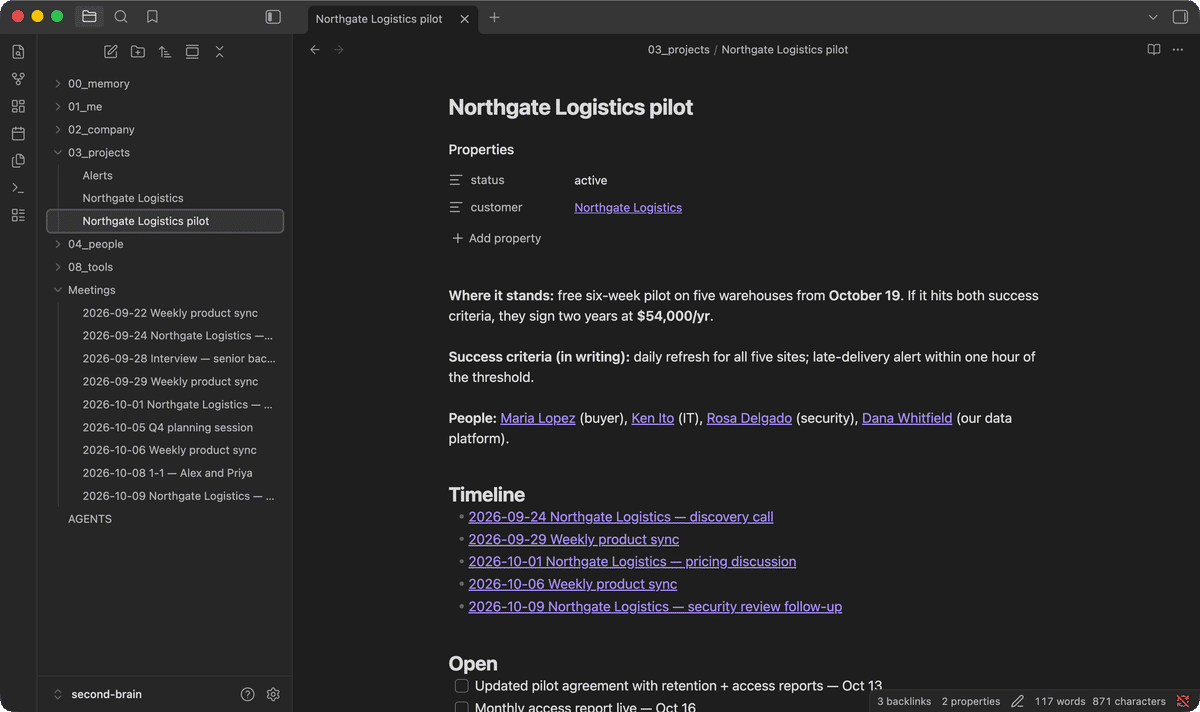
Over a few weeks this turns into a map of the work: meetings linked to the people in them, the projects they move and the decisions they produced.
What I actually ask it
Once meetings live next to everything else, the questions get better. Here is a real answer from Claude Code, run against the demo vault:
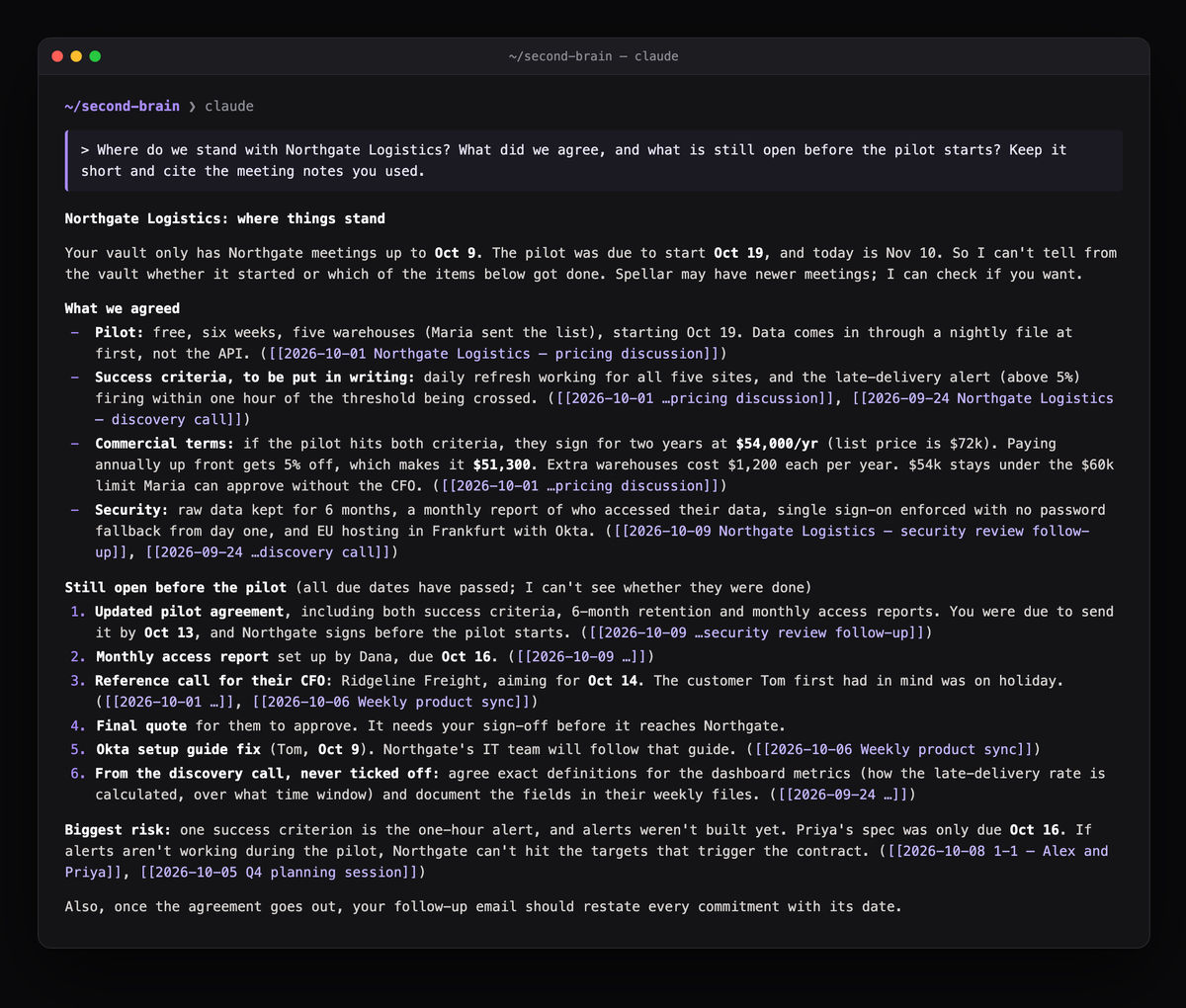
Three things in that answer are worth noticing. It cites the meetings it used, so I can check every claim. It uses the memory notes: it knows the customer's approval limit and that a quote needs my sign-off. And it spots a risk no single meeting states: the pilot's success depends on a feature whose spec wasn't due until later.
The questions I ask most:
- Before a call: "Prepare me for my call with Northgate: last three meetings, what we promised, what's still open."
- After a call: "Draft the follow-up for today's call. Restate every commitment with its date."
- On Fridays: "Weekly review: what did I agree to this week, with whom, and what slipped?"
- When something feels off: "When did we decide to defer anomaly detection, and why?"
- For the team: "Update the decisions log from this week's meetings."
When the vault isn't enough: MCP
The vault holds the meetings I export. When I need more, such as searching across every meeting I've ever recorded, the agent can ask Spellar directly through its MCP server. I wrote about that in Ask Claude, ChatGPT or Cursor About Your Meetings. The two work together: the vault is the long-term memory, MCP is the search over everything.
The rules that keep it trustworthy
A second brain that agents write to needs a few rules. These are the ones in my AGENTS.md:
- Spellar is the source of truth for meetings. Agents read
Meetings/and never edit it. If a note is wrong, I fix it in Spellar. - Cite the meeting. Any answer that comes from a meeting links the note it came from.
- Propose by default. Agents draft, summarise and plan freely. Anything that sends, posts or deletes waits for my yes.
- Private stays private. Some folders are only for me, and nothing from them goes into an email, a message or a document for someone else.
- Decisions get logged. Every decision goes into one log, newest first, with a link to the meeting it came from.
Set it up this afternoon
- Create the vault. Make a folder, open it in Obsidian as a vault, and put it under git if you want history.
- Add the folders and an
AGENTS.md. Start small; the template below is enough. - Connect Spellar. In the Mac app, Settings → Connectors → Obsidian, choose the vault and turn on auto-export.
- Point your agent at the folder. Open it in Claude Code, Codex or Cursor.
- Record a week of meetings, then ask your first question.
A starter AGENTS.md:
# Agent instructions

This vault is my second brain. Read this file first.

## Map
- 00_memory/  how I work, one note per fact; MEMORY.md is the index
- 02_company/ strategy and the decisions log
- 03_projects/ one note per project, linked to meetings and people
- 04_people/  one note per person
- Meetings/   written by Spellar; read-only for agents

## Rules
- Propose by default. Never send, post or delete without my OK.
- When an answer comes from a meeting, link the note.
- Log every decision in 02_company/Decisions log.md with its meeting.

## Every session
1. Read 00_memory/MEMORY.md.
2. Check Meetings/ for new notes and update the projects and people they touch.
The first week it feels like a nicer archive. By the third, I stopped searching for what was said in meetings and started asking.
— Zino, founder of Spellar
Never miss a meeting detail again
Spellar captures your meetings without bots, generates clear summaries, and pushes action items to your tools.