
Calendar, rebranding and One More Thing
Hey everyone!
We've got a big update for you. First, let's start with some exciting news. During the last month, we've had a crazy story unfold, and we're going to share all the details with you tomorrow on Twitter. If you haven't subscribed to our Twitter yet, now's a good time. Because of this story, we've gone through a rebranding. So from now on, we're known as Spellar AI.
Now, onto the new stuff in this update. We're thrilled to roll out a groundbreaking Menu Bar Calendar Feature designed specifically for managing your conference calls with ease and don't forget Spellar recordings to start 🌝. We've also polished user preferences, bringing you more customization options and better system analysis. Plus, there are plenty of other improvements and bug fixes.
Menu Bar Calendar Feature for Conference Calls
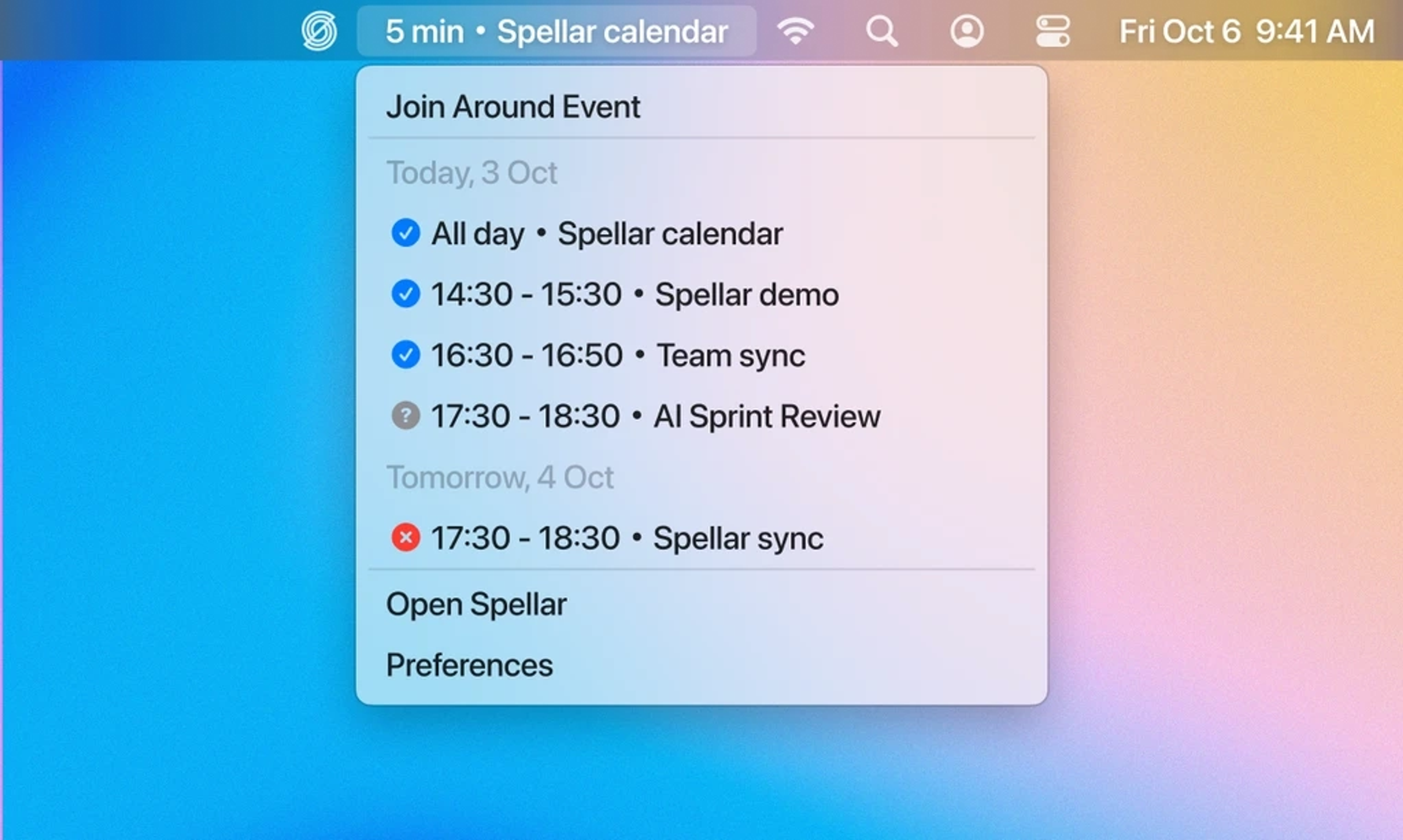
- Never Miss a Recording: The feature ensures you never forget to start recording when your conference call begins. A smart notification nudges you just in time.
- Overview in the Menu Bar: Easily access your entire schedule right from the menu bar, offering you a quick overview without opening the full calendar.
- Instant Join for Events: Your next event appears in the menu bar for quick and easy access. Click on it to join the conference call instantly. If the conference service has a native app installed, it launches automatically.
- Real-Time Updates: Any new invites or changes to existing events are updated in the menu bar instantly, keeping you in the loop at all times.
- Status Indicators: Icons provide a quick status overview for events, such as "Unresponded", "Maybe", or "All participants have declined".
- Quick Actions for RSVP: Without opening the full calendar, change your RSVP status or email participants directly from the menu bar.
- Manage Time Efficiently: A built-in timer in the menu bar lets you keep track of the duration of your ongoing meetings.
- Smart Alerts for Back-to-Back Meetings: Receive smart notifications for consecutive meetings, so you're always prepared for the next one.
- Personalize to Your Liking: Adjust settings like pop-up timings and visible calendars to suit your personal needs.
- Universal Compatibility: Syncs with iCloud, Exchange, Google, Yahoo, and other CalDav services.
New Features
- Switching Microphones: Now switch your microphone effortlessly from either the menu bar or settings for optimum audio quality.
- Enhanced User Profile: Update your occupation and dialect. This improves the system's analysis and tailors the experience more closely to your needs.
- Onboarding: Refined the onboarding experience with new audio wave guidance and question prompts.
- Menu Bar: Included a new version label for easier identification.
Improvements
- Content & Typography: Consistent and comfortable visual upgrades in fonts and typography.
Bug Fixes
- Content & Recordings: Resolved text overlap, scroll-jump issues, and focus loss or drag when toggling between windows.
- Design & Pronunciation Popover: Fixed inconsistencies and unresponsive issues.
- General: Addressed crashes for some users.
Third-Party Extensions
- Access Tokens: Added a feature to copy access tokens for use in third-party extensions (Raycast Extension is coming soon).
Try the latest version of Spellar
Bot-free meeting notes powered by the best AI models. Download Spellar and experience every update firsthand.